
From Empty Account to Production: Building a SaaS Platform on AWS with Terraform
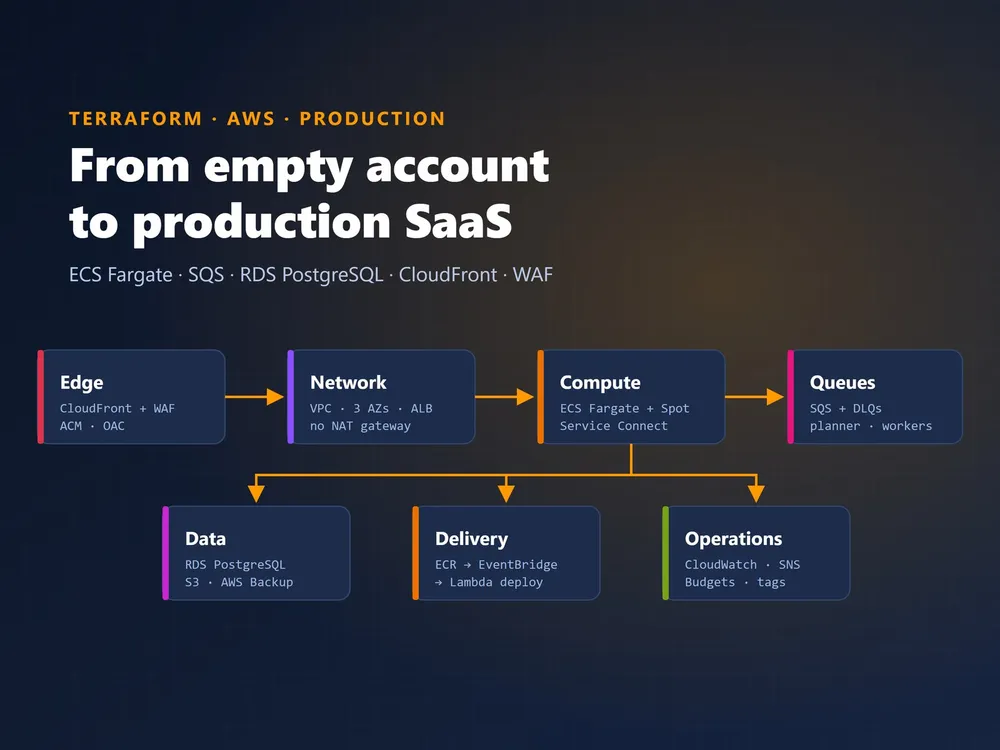
Moving an application from “it works on a server” to a production platform that scales, heals itself, deploys without anyone logging in, and doesn’t surprise you on the monthly bill is a different job from writing the application. This post walks through how we built the complete AWS infrastructure for a multi-tenant SaaS platform, every piece in Terraform, and what we learned on the way.
The application has three parts:
- A Next.js website that users sign in to
- A Node.js API with one PostgreSQL database per customer (tenant)
- A fleet of headless-browser workers that crawl and process external websites, sometimes thousands of pages per job
That last part shaped many of the decisions: the workload is bursty, long-running and CPU-heavy, so it can’t share a box with the web tier.
The Architecture at a Glance
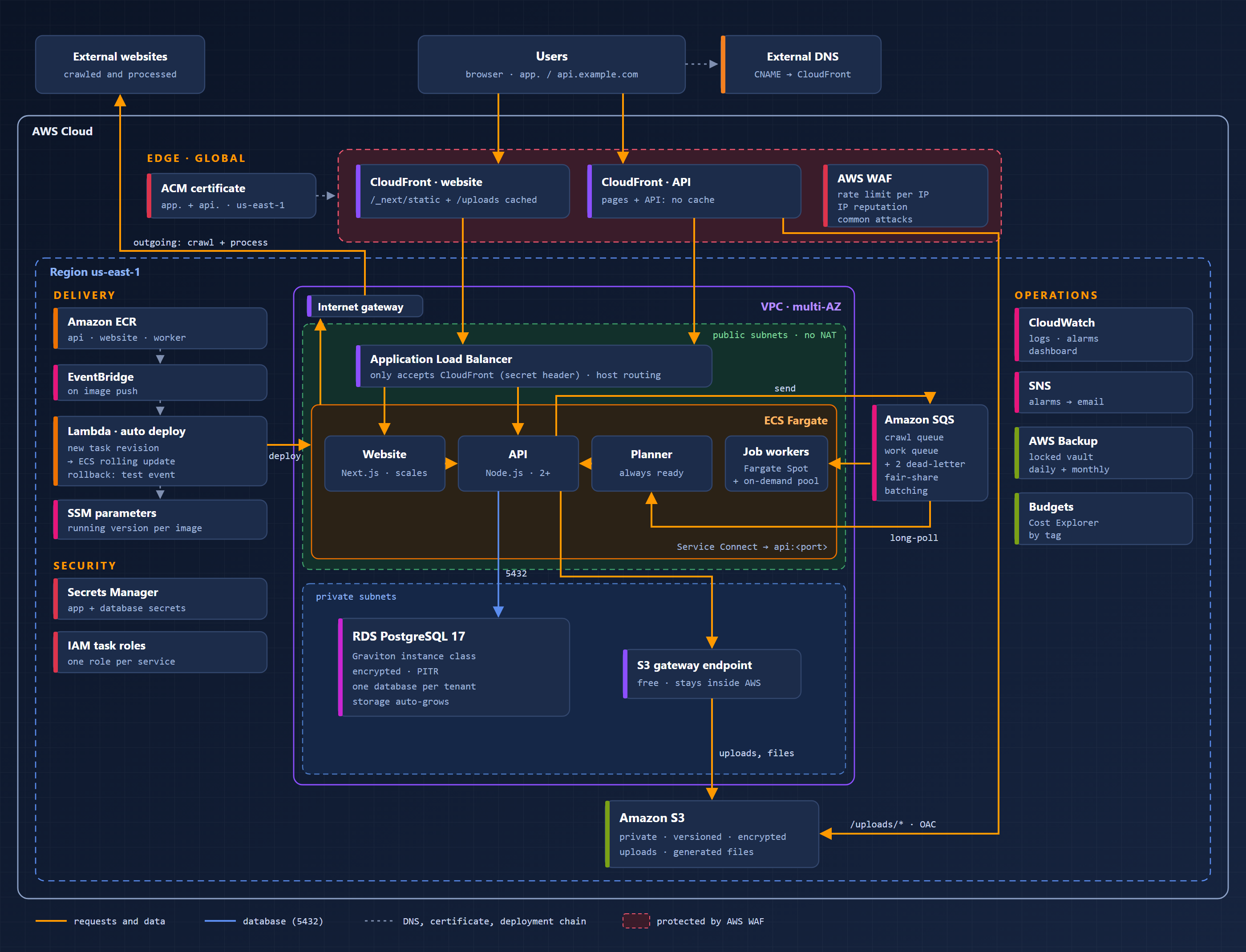
Request path Users reach two CloudFront distributions, one for the website and one for the API, both protected by AWS WAF. CloudFront forwards to a single Application Load Balancer, which routes by host header to the website or the API service on ECS Fargate.
Work path The API never does heavy work itself. It drops a message on Amazon SQS. A planner service discovers the pages (sitemap plus link crawling) and splits them into batches. Job workers pick the batches up, run the browser, and report results back to the API.
Data path RDS PostgreSQL holds the data, S3 holds uploads and generated files, and CloudFront serves those files directly from S3.
1. Everything in Terraform, from Day One
One root module, split by concern
Instead of a deep tree of modules, we used one root module with a file per area: network.tf, alb.tf, cloudfront.tf, ecs.tf, autoscaling.tf, database.tf, storage.tf, waf.tf, alarms.tf, backup.tf, billing.tf, dashboard.tf and auto-deploy.tf. A single terraform.tfvars describes the environment. For one product with one production environment, this is far easier to read and review than an abstract module hierarchy.
Tests without touching AWS Terraform’s native test framework with mock providers lets us assert on the plan without credentials or cost:
mock_provider "aws" {
  mock_resource "aws_wafv2_web_acl" {
    defaults = { arn = "arn:aws:wafv2:us-east-1:123456789012:global/webacl/mock/abc" }
  }
}

run "waf" {
  command = plan
  assert {
    condition     = aws_cloudfront_distribution.api.web_acl_id == aws_wafv2_web_acl.cloudfront[0].arn
    error_message = "Both distributions should use the WAF."
  }
}
The test runs cover things like:
- the database backups exist
- the job planner is always ready
- feature switches turn resources off cleanly
These tests caught real bugs before they reached AWS. One example: a budget filter where $${var.name} had silently become literal text.
Tags everywhere, automatically
default_tags on the provider stamps Project and Environment on every resource. That one setting powers the cost reports, the budget filter and an AWS resource group that lists everything the project owns.
Region-proof names Account-wide resources (IAM roles, the S3 bucket, CloudFront origin access control) carry the region in their names. A second region later is then just another apply, not a rename exercise.
2. The Network: Multiple AZs and No NAT Gateway
The VPC spans several Availability Zones with public and private subnets.
Containers run in public subnets with public IPs, outgoing only. Security groups allow inbound traffic only from the load balancer. This skips NAT gateways completely. A NAT gateway per AZ costs a fixed monthly fee each plus data processing charges, just so containers can reach the internet. Our workers download pages from external websites all day, so NAT data processing would have been a meaningful line on the bill.
The database lives in private subnets with no route to the internet at all.
An S3 gateway endpoint (free) keeps S3 traffic for uploads and generated files inside AWS.
3. The Edge: CloudFront, a Locked-Down ALB, and WAF
CloudFront in front of everything
- Static Next.js assets (
/_next/static/*) and uploaded files (/uploads/*) are cached at the edge. - Pages and API calls pass straight through with caching disabled.
- Uploaded files come directly from S3 through Origin Access Control, so the bucket stays fully private and the API never streams files.
The load balancer only talks to CloudFront CloudFront adds a secret header to every request, and the ALB listener rejects anything without it. Hitting the load balancer’s own DNS name directly gets you nothing.
AWS WAF One web ACL protects both distributions for a few dollars a month. It has three rules:
- A rate limit per IP address over a 5-minute window. Cached static files are excluded from the count, so ordinary page loads barely touch it. Set the limit high enough for an office of people sharing one IP address.
- The AWS IP reputation list, which blocks known bots and attack sources.
- The AWS Common Rule Set, for SQL injection, XSS and malformed requests.
Lesson learned: the Common Rule Set includes rules that inspect the request body. Our app legitimately sends HTML snippets, file paths and large uploads, and those rules would have blocked normal use. We switched just those body rules to count mode:
dynamic "rule_action_override" {
  for_each = ["SizeRestrictions_BODY", "CrossSiteScripting_BODY", "GenericLFI_BODY", "GenericRFI_BODY", "EC2MetaDataSSRF_BODY"]
  content {
    name = rule_action_override.value
    action_to_use {
      count {}
    }
  }
}
Always check managed rules against what your application really sends before switching on blocking.
4. Compute: ECS Fargate, Spot, and Service Connect
Every workload runs on ECS Fargate, so there are no servers to patch.
| Service | Role | How it scales |
|---|---|---|
| Website | server-rendered pages | CPU target tracking |
| API | business logic, the only service that writes to the database | CPU target tracking, always more than one copy |
| Planner | discovers pages and splits work into batches | queue depth, one always ready |
| Job workers (Spot) | headless browser, the heavy lifting | queue depth, down to zero when idle |
| Job workers (on-demand) | small always-on pool plus fallback | queue depth |
Spot for the heavy lifting Background workers are ideal for Fargate Spot, which is much cheaper than on-demand: the work is batched and resumable, and an interrupted batch simply goes back to the queue. A small always-on on-demand pool means small jobs start immediately, and more on-demand workers step in if Spot capacity runs short.
Service Connect for internal calls
The website’s server-side code and the workers reach the API at a short internal address like http://api:<port>. That traffic never leaves the VPC, never goes through CloudFront or WAF, and doesn’t count against the rate limit.
One image, two roles
The planner and the workers are the same Docker image started with a different MODE environment variable: one build, one repository, one version to track.
5. A Queue-Driven Job Pipeline
Long-running work doesn’t belong in HTTP requests. The pipeline uses two SQS queues:
- Crawl queue: the API posts a crawl job. The always-ready planner picks it up within seconds, reads the sitemap, follows links and registers pages with the API. It registers a small first batch so results appear quickly, then larger ones.
- Work queue: batches are released a few at a time per job, so one huge website can’t starve everyone else. Workers long-poll, claim a batch from the API (exactly one worker wins), process it, send regular heartbeats, and post results.
Both queues have dead-letter queues, so a batch that keeps crashing is set aside for inspection instead of looping forever. A CloudWatch alarm fires when anything lands there.
The worker count scales on the number of messages waiting, not on CPU, because queue depth is the real measure of pending work.
6. Going from One API Copy to Many
Running a second API copy for redundancy sounds like changing a 1 to a 2. It wasn’t. Four pieces of state lived in a single process’s memory, and each would have broken with more than one copy:
| Problem with 2+ copies | Fix |
|---|---|
| SSO one-time exchange codes were stored in memory: the browser could land on a different copy and fail to sign in | A database table storing only a hash of each code; a DELETE that must affect exactly one row makes each code single-use |
| The scheduled-job loop ran in every copy and could start the same job twice | A lease row in the database: only the holder runs the check, and another copy takes over if the holder dies. Each job is also claimed with a conditional UPDATE, as a second safety net |
Saving results used an in-process queue, because record numbers are max + 1 | A per-tenant PostgreSQL advisory lock (pg_try_advisory_lock), released automatically if a copy crashes |
| Sign-in rate limits counted per copy | Counters moved to a shared table |
If you plan to scale horizontally, search the code for new Map() and setInterval early. Every one is a question: what happens when there are two of me?
7. Data: RDS PostgreSQL, Backups and S3
Database RDS PostgreSQL on a Graviton instance class, encrypted, with storage that grows on its own and point-in-time recovery switched on. Each tenant gets its own database, which keeps customer data separated and makes per-customer restores straightforward. Start with an instance class you can justify; RDS resizes in minutes, so it’s cheap to change later.
Backups beyond the defaults AWS Backup takes daily and monthly snapshots, each with its own retention, into a vault with Vault Lock in governance mode. Not even an administrator mistake can delete recovery points early. An EventBridge rule sends any failed or expired backup job to the alert email.
Files A private, versioned, encrypted S3 bucket. Generated files get random names, so the CloudFront cache never serves a stale one. For the rare file replaced under the same name, one invalidation clears it:
aws cloudfront create-invalidation --distribution-id <ID> --paths "/uploads/*"
The first 1,000 invalidation paths each month are free, and a wildcard counts as one.
8. Zero-Touch Deployments with an Emergency Rollback
We wanted releases to be “push the image and walk away”:
docker push (version tag)  ->  ECR event  ->  EventBridge rule  ->  Lambda
  ->  new task definition revision  ->  ECS rolling update (with circuit breaker)
The Lambda copies the current task definition, swaps only the image tag, registers a new revision and updates every service that uses it. The worker image updates the planner and all worker services at once. The ECS deployment circuit breaker rolls back by itself if the new version fails to start.
Keeping Terraform and the pipeline from fighting
If Terraform also sets the image tag, the next terraform apply would quietly roll production back to whatever is written in terraform.tfvars. Instead, the Lambda writes the running version to an SSM parameter per image, and Terraform reads it:
resource "aws_ssm_parameter" "image_tag" {
  for_each       = toset(["api", "website", "worker"])
  name           = "/${var.name}/image-tag/${each.key}"
  type           = "String"
  insecure_value = var.initial_image_tags[each.key]
  lifecycle {
    ignore_changes = [insecure_value] # the Lambda owns it after the first apply
  }
}
Settings changes (environment variables, CPU, memory) still roll out through Terraform, always with the version that is actually running.
Emergency rollback from the console The same Lambda accepts manual test events, so anyone with console access can roll back in seconds:
{ "image": "api", "list": true }
{ "image": "api", "tag": "<previous version>" }
The first lists the running version and the available versions, newest first. The second deploys an older one; it refuses tags that don’t exist in ECR.
Database migrations stay explicit
Migrations run as a one-off ECS task using the same task definition (aws ecs run-task with a command override), or from an admin screen in the application. Code rollbacks don’t undo migrations, so migrations are written to be backward compatible.
9. Observability and Cost Control
A CloudWatch dashboard without Container Insights Container Insights is convenient but billed per metric. A hand-built dashboard covers what we look at every day using free, built-in metrics:
- ALB requests, latency and errors
- CloudFront error rates
- CPU and memory per ECS service
- queue depth, the age of the oldest message, and dead-letter queues
- RDS CPU, connections, memory, storage and latency
- an alarm status panel and a Logs Insights error panel
The dashboard stays under 50 metrics, so it remains in the free tier.
Alarms to email CloudWatch alarms (5xx errors, unhealthy hosts, database CPU and storage, dead-letter messages, stuck queues) notify an SNS topic that emails the team.
Money
- An AWS Budget filtered on the
Projecttag alerts at a share of actual spend and on forecast spend. - Cost allocation tags make Cost Explorer show the whole platform as one line.
Where the Money Goes
| Area | Share of the idle bill |
|---|---|
| RDS PostgreSQL | the largest single item |
| Always-on worker pool | the second largest, the price of jobs starting instantly |
| Website, API and planner on Fargate | a steady middle slice |
| Load balancer and public IPv4 addresses | small but fixed |
| WAF, CloudWatch, backups, S3, ECR, secrets | a few percent together |
The database and the always-on workers make up most of the idle bill. Both are deliberate choices for responsiveness, and both can be turned down in one line of terraform.tfvars. Spot workers cost nothing when no jobs are running.
Region matters We priced the same setup in another region using the AWS Pricing API, and it came out noticeably higher, mostly because of the database instance price. Check regional pricing before you choose a “closer” region.
Lessons Learned the Hard Way
- SNS topic policies don’t accept
SNS:*. List the actions explicitly, or the apply fails with “Policy statement action out of service scope”. - Turn off deletion protection before
terraform destroy. Otherwise the destroy hangs for a long time on the internet gateway, because the protected ALB and RDS instance can’t be deleted. - Changing DNS providers or recreating distributions? Remove the old CNAME records first. CloudFront refuses an alias that another distribution still claims (
CNAMEAlreadyExists). - Windows Git Bash rewrites arguments that start with
/. SSM parameter names and/ecs/...log groups get mangled unless you setMSYS_NO_PATHCONV=1. - Load test before you trust a number. Auto scaling needs a minute or two to add copies, and the load balancer needs time to grow. A sudden spike of real users needs scaled-up minimums or pre-warming, not just a higher maximum.
Wrapping Up
The final platform:
- serves users through a protected edge
- scales background workers from zero to dozens on demand
- survives the loss of an API copy
- deploys a new version within a minute of
docker push - rolls back from the AWS console
- backs itself up into a vault nobody can empty early
All of it is described in a few hundred lines of reviewed, tested Terraform. None of the pieces is exotic. The value is in how they fit together, and in planning early for what happens when there is more than one of everything.